TOOLTIPS 功能扩展
| 函数名 | 参数 |
|---|---|
 TOOLTIP_CUSTOM | int |
TOOLTIP_SETFONT | string |
TOOLTIP_SETFONTSIZE | int |
TOOLTIP_FORMAT | int |
API
TOOLTIP_CUSTOM bool
TOOLTIP_SETFONT fontName
TOOLTIP_SETFONTSIZE fontSize
TOOLTIP_FORMAT formatFlags
HTML_PRINT 的提示框功能扩展。
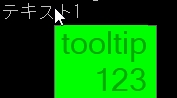
TOOLTIP_CUSTOM:要使用以下提示框功能扩展时,TOOLTIP_CUSTOM的参数设为非0以开启功能。指定为0时扩展功能关闭,以原版提示框的方式显示。TOOLTIP_SETFONT:设置提示框内文字的字体名称。TOOLTIP_SETFONTSIZE:设置提示框内文字的字体大小名称。TOOLTIP_FORMAT:设置提示框内文本的格式。参数参考 C# 的TextFormatFlags。- 原版中已有的
TOOLTIP_SETCOLOR现在在扩展功能开启时能正常生效。 - 提示框内现在可使用
<br>标签。扩展功能关闭时仍然有效。
提示
仅支持命令式写法。
示例代码
MAIN.ERB
@SYSTEM_TITLE
    TOOLTIP_CUSTOM 1
    TOOLTIP_SETCOLOR 0x00AA00, 0x00FF00
    TOOLTIP_SETFONT "Ariel"
    TOOLTIP_SETFONTSIZE 24
    TOOLTIP_FORMAT 2;Right Alignment

    HTML_PRINT "<nonbutton title='tooltip<br>123'>テキスト1</nonbutton>"
    PRINTL
    PRINTL
    PRINTL
    WAIT

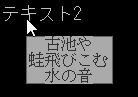
    TOOLTIP_SETCOLOR 0x333333, 0xAAAAAA
    TOOLTIP_SETFONT "MS 明朝"
    TOOLTIP_SETFONTSIZE 12
    TOOLTIP_FORMAT 1;Center
    HTML_PRINT "<nonbutton title='古池や<br>蛙飛びこむ<br>水の音'>テキスト2</nonbutton>"
    PRINTL
    PRINTL
    PRINTL
    WAIT